
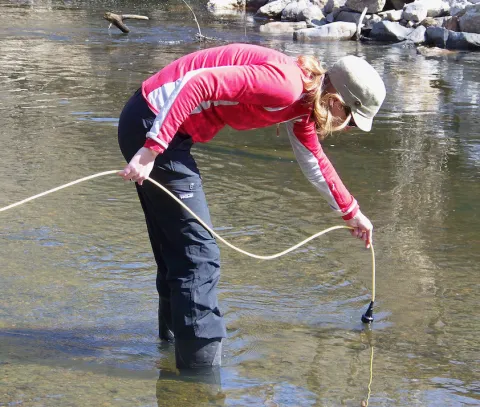
The Hach HQ30d hand-held meter, donated by Claude Labine, has a probe for measuring dissolved oxygen (DO) in a water body. The Mid Shuswap & Lumby (MSL) stewards have used this instrument for years and the DO and water temperature values thus gathered are posted to this database.
Readings taken are stored in the meter, and can be downloaded later to a flash drive, or stepped through one by one on the meter's screen (or both).

Set the Date & Time prior to each field trip
In this database each sample stores the time of day the sample was removed from the water body. The time can be recorded on paper from a vehicle clock or mobile device or whatever, but it is more convenient to rely on the Hach meter's record of the time it was used to record DO.

Set the Site ID prior to each sampling
To prevent confusion when posting to this database, set the Sample ID to reflect the site at which the sample will be taken. A complete list of Sample IDs (sites) should be entered once a sampling plan has been established; then during the field trip any site ID can be selected as it becomes the current one.
To select another site not the most recent one:
- select the beaker icon
- select the "Current ID" using the green "Select" button
- using the up or down arrowhead, in the list displayed scroll to the ID desired.

Optionally set the Operator ID
This database doesn't store the identity of the sampler(s). But should circumstances require this information, the operator of the meter, or the group to which they belong, can be selected from a list similar to Sample IDs, and recorded along with DO and the other parameters. Proceed as with Sample ID, but select the operator icon.
Taking a Reading
- assure the probe is installed, Date and Time were set, and the Sample ID has been determined (and optionally the Operator ID).
- power on and wait for the Connect a Probe progress bar to affirm connection.
- place the probe in the water body assuring that the sensor at the other end from the cable is completely immersed.
- press the green "Read" button.
- wait for the Stabilizing progress bar to disappear, indicating stabilization of the reading.
At this point the reading has been stored in the meter, for later display and/or download.
Downloading to a USB Flash Drive
The HQ30d meter technology was developed prior to USB-C, so USB 3.0 is the most advanced flash drive its hardware and software can accomodate.
The manual shows on page 7 the cables available for downloading the data log. It indicates a HQ40d unit, but they work fine with the HQ30d which we have.
- Acquire a flash drive with the correct format.
- this download requires FAT32; you may have to partition a drive if you want to use the majority of its storage for other purposes.
- Plug the supplied AC power cord into a 120V or 240V power receptacle and into the supplied AC-DC power supply; plug the AC-DC power supply cable into the supplied USB/DC adapter; plug the USB/DC adapter into the middle receptacle of the meter.
- Plug the FAT32-formatted flash drive into the USB port.

With power on and cables and flash drive connected, select the data icon. Use the down arrowhead to choose Send Data Log.
Select Send Data Log using the green Select button. When the operation is complete a new .TXT file will appear on the flash drive (first partition). Modify this file extension to ".csv" so software doesn't treat it as a text file, but rather as a spreadsheet.